帝国CMS文章内容页下载附件时恢复为原始名称
在你的内容模板里加入下面的代码,可显示出原始文件名,下载保存时也会保存为原始文件名:
<!--下载附件时恢复为原始文件名称-->
<script>document.addEventListener("DOMContentLoaded",()=>{document.querySelectorAll("fieldset").forEach(f=>{let l=f.querySelector("legend"),t=l?.textContent?.trim(),a=f.querySelector("a");if(t&&a){a.textContent=t;a.setAttribute("download",t);l.textContent="下载文件"}});});</script>
原模板下载后的附件名都是随机的一长串数字,这样改一下,就不用手动再去改下载后的文件名了,很方便。
(注:后台编辑文章时还是不变的,附件名还是一串乱七八糟的数字,发布后前台会改变)
效果演示: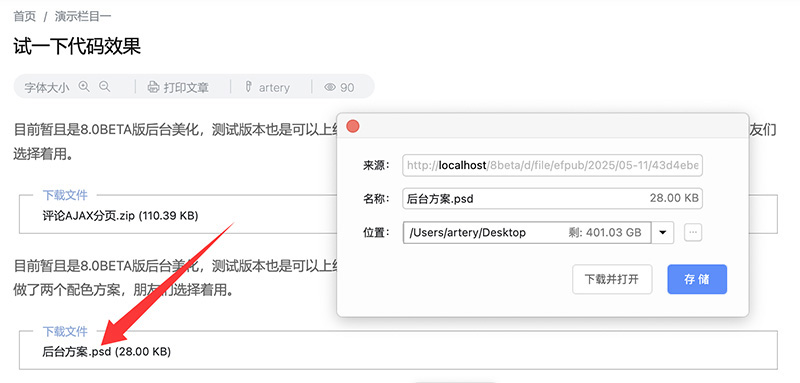
另一个:
下载模型中,将下载文件名改为与标题一致
在“最终下载页模板”下方加入以下JS,可实现下载文件时存档文件名与标题一致,自动加入文件后辍,省了让那一长串随机数字带来的烦恼:
<!--将下载文件名改为与标题一致-->
<script>document.addEventListener("DOMContentLoaded",function(){var t=(document.title.split(" - ")[0]||"download").trim(),e={"application/zip":".zip","application/x-rar-compressed":".rar","application/x-7z-compressed":".7z","application/gzip":".gz","application/x-tar":".tar","application/pdf":".pdf","application/msword":".doc","application/vnd.openxmlformats-officedocument.wordprocessingml.document":".docx","application/vnd.ms-excel":".xls","application/vnd.openxmlformats-officedocument.spreadsheetml.sheet":".xlsx","application/vnd.ms-powerpoint":".ppt","application/vnd.openxmlformats-officedocument.presentationml.presentation":".pptx","application/octet-stream":"","text/plain":".txt","image/jpeg":".jpg","image/png":".png","image/gif":".gif","image/webp":".webp","video/mp4":".mp4","audio/mpeg":".mp3","audio/wav":".wav","video/x-msvideo":".avi","application/x-msdownload":".exe"},n=document.querySelectorAll('a[href*="doaction.php?enews=DownSoft"]');for(var r=0;r<n.length;r++)!function(n){n.addEventListener("click",function(r){r.preventDefault();var a=n.href,o=new XMLHttpRequest;o.open("GET",a,!0),o.responseType="blob",o.onload=function(){if(200===o.status){var n=o.getResponseHeader("Content-Type")||"",r=e[n.toLowerCase()]||function(t){var e={0:".zip",1:".rar",2:".pdf",3:".docx",4:".7z",5:".tar",6:".xlsx",7:".pptx",8:".mp4",9:".mp3",10:".txt"};try{var n=t.match(/pathid=(\d+)/);return n?e[n[1]]||"":""}catch(t){return""}}(a)||".bin",i=t+r,c=o.response;if(window.navigator&&window.navigator.msSaveOrOpenBlob)window.navigator.msSaveOrOpenBlob(c,i);else{var d=URL.createObjectURL(c),l=document.createElement("a");l.href=d,l.download=i,document.body.appendChild(l),l.click(),document.body.removeChild(l),URL.revokeObjectURL(d)}}else alert("下载失败,请稍后再试。")},o.onerror=function(){alert("请求出错,下载失败。")},o.send()})}(n[r])});</script>